Table of Contents
ToggleBest SEO Internal Linking Clusters: The Ultimate Guide to Building Powerful Topic Clusters for Higher Rankings (3000 Words)
Search engine optimization continues to evolve as search engines become smarter in understanding website structure and content relationships. One of the most powerful yet often overlooked SEO techniques is internal linking clusters, also known as topic clusters. When implemented correctly, internal linking clusters can significantly improve website rankings, user experience, and crawlability.
Search engines like Google prioritize websites that have a clear content structure and strong internal linking. This guide will explain everything you need to know about SEO internal linking clusters, including strategy, benefits, structure, and best practices.
What Are SEO Internal Linking Clusters?
An SEO internal linking cluster is a content structure where multiple related pages are connected through internal links around a central topic.
This model typically consists of:
-
Pillar Page – A broad topic page
-
Cluster Content – Detailed articles about subtopics
-
Internal Links – Links connecting all related pages
This strategy helps search engines understand your website’s authority on a topic.
For example:
Pillar Page:
Digital Marketing Guide
Cluster Pages:
-
SEO Strategy
-
Content Marketing
-
Social Media Marketing
-
Email Marketing
-
PPC Advertising
All cluster pages link back to the pillar page, and the pillar page links to each cluster article.
Why Internal Linking Clusters Are Important for SEO
Search engines analyze how pages are connected to understand the relevance and importance of content.
Internal linking clusters help by:
1. Improving Website Structure
A clear internal linking structure helps search engine crawlers easily navigate your website.
2. Increasing Keyword Rankings
When related pages link to each other, they build topical authority, which improves rankings for related keywords.
3. Boosting Page Authority
Internal links distribute link equity across pages, strengthening your site’s authority.
4. Improving User Experience
Users can easily navigate between related topics, increasing time spent on your site.
5. Helping Search Engines Understand Context
Search engines like Google use internal links to understand the relationship between pages.
Pillar Pages vs Cluster Content
Understanding the difference between pillar pages and cluster content is essential.
| Element | Description |
|---|---|
| Pillar Page | Broad topic covering a main subject |
| Cluster Content | Detailed articles about subtopics |
| Internal Links | Links connecting pillar and cluster pages |
Example:
Pillar Page:
SEO Guide
Cluster Articles:
-
Keyword Research Guide
-
On-Page SEO Techniques
-
Technical SEO Guide
-
Link Building Strategies
-
Local SEO Tips
Each article links to the pillar page and vice versa.
How Internal Linking Clusters Work
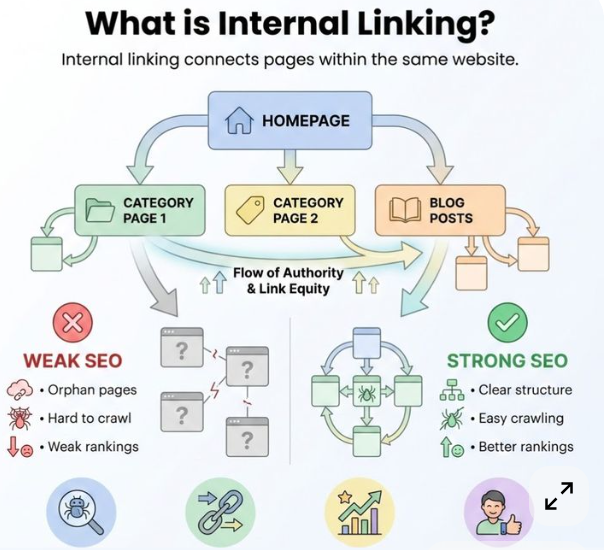
Internal linking clusters create a hub-and-spoke model.
Structure:
Pillar Page
↓
Cluster Page 1
Cluster Page 2
Cluster Page 3
Cluster Page 4
Each cluster article links back to the pillar page.
Example:
Pillar Page:
Content Marketing Guide
Cluster pages:
-
Blog Writing Tips
-
SEO Content Strategy
-
Content Promotion
-
Content Optimization
This structure tells search engines your website has expertise in that topic.
Benefits of Internal Linking Clusters
1. Strong Topical Authority
Topic clusters signal to search engines that your website has deep knowledge on a specific topic.
For example, if your website has 20 pages about SEO that link together, search engines see your site as an SEO authority.
2. Better Indexing
Internal links help search engine bots crawl and index pages faster.
Search engine crawlers follow links across your site, discovering new pages.
3. Improved User Engagement
Visitors are more likely to read multiple pages when content is connected.
This increases:
-
Page views
-
Session duration
-
Conversion rates
4. Higher Keyword Visibility
Cluster pages target long-tail keywords while pillar pages target broad keywords.
Example:
Pillar Keyword
Digital Marketing Strategy
Cluster Keywords
-
Digital marketing strategy for small business
-
Digital marketing strategy examples
-
Digital marketing planning guide
5. Reduced Bounce Rate
Internal links guide users to other relevant content instead of leaving the site.
How to Build an SEO Internal Linking Cluster
Creating topic clusters requires planning and strategic content creation.
Step 1: Choose a Core Topic
Start with a broad topic relevant to your industry.
Examples:
-
Digital Marketing
-
SEO
-
Social Media Marketing
-
Email Marketing
-
Content Marketing
Your pillar page will target the main keyword.
Example:
Main Keyword:
Digital Marketing Guide
Step 2: Conduct Keyword Research
Identify related keywords and subtopics.
You can use SEO tools like:
-
Ahrefs
-
SEMrush
-
Ubersuggest
-
Google Keyword Planner
Find long-tail keywords related to your pillar topic.
Example keywords:
-
SEO internal linking strategy
-
Internal linking structure
-
Topic cluster SEO
-
SEO silo structure
-
Blog internal linking tips
Step 3: Create the Pillar Page
Your pillar page should cover the topic broadly.
Characteristics of a pillar page:
-
3000+ words
-
Comprehensive overview
-
Links to cluster pages
-
Optimized for primary keyword
Example structure:
Introduction
What is SEO
Importance of SEO
SEO Techniques
Internal Linking Strategy
Conclusion
Step 4: Create Cluster Content
Each cluster article should focus on one specific subtopic.
Examples:
Cluster Topic Ideas
-
Internal Linking Strategy
-
Anchor Text Optimization
-
Content Silos
-
Blog Structure for SEO
-
Website Architecture
Each article should link to the pillar page.
Step 5: Use Strategic Anchor Text
Anchor text is the clickable text used in links.
Good anchor text examples:
-
SEO internal linking strategy
-
topic cluster SEO guide
-
website internal linking structure
Avoid generic anchors like:
-
Click here
-
Read more
Search engines analyze anchor text to understand page context.
Step 6: Link All Cluster Pages Together
Cluster pages should also link to other related cluster pages.
Example:
Internal Linking Strategy → Anchor Text Optimization → SEO Site Structure
This strengthens topical relevance.
Best Internal Linking Practices
1. Use Contextual Links
Place links naturally within content rather than only in navigation menus.
Example:
“One important strategy is internal linking optimization, which improves website crawlability.”
2. Avoid Too Many Links
Too many links can dilute link value.
Ideal number:
5–10 internal links per article.
3. Keep Links Relevant
Only link to pages that are contextually related.
Irrelevant links confuse search engines.
4. Use Descriptive Anchor Text
Anchor text should clearly describe the linked page.
Example:
Good
Internal linking strategy guide
Bad
Click here
5. Update Old Content
Add internal links when publishing new articles.
This helps older pages remain relevant.
Internal Linking Cluster Example
Let’s look at a real example.
Pillar Page:
SEO Guide
Cluster Articles:
-
Keyword Research Guide
-
On-Page SEO Techniques
-
Technical SEO Basics
-
Internal Linking Strategy
-
Link Building Guide
Internal linking structure:
Pillar Page → All Cluster Pages
Cluster Pages → Pillar Page
Cluster Pages → Related Cluster Pages
This creates a strong SEO content network.
Common Internal Linking Mistakes
Avoid these common mistakes.
1. Orphan Pages
Pages without internal links cannot be discovered easily by search engines.
2. Over-Optimized Anchor Text
Using the same anchor text repeatedly can appear manipulative.
3. Broken Internal Links
Broken links harm user experience and SEO.
4. Linking Irrelevant Content
Links should always connect related topics.
Advanced Internal Linking Strategies
1. Content Silos
Content silos group related content under specific categories.
Example:
SEO Category
-
Keyword Research
-
Technical SEO
-
Link Building
-
On-Page SEO
Each category creates a topical authority.
2. Breadcrumb Navigation
Breadcrumbs help users understand website structure.
Example:
Home → SEO → Internal Linking Guide
3. Automated Internal Linking
Some SEO plugins automatically suggest internal links.
Examples:
-
Yoast SEO
-
Rank Math
These tools help identify linking opportunities.
Measuring Internal Linking Success
Track the performance of your internal linking strategy using tools like:
-
Google Analytics
-
Google Search Console
Key metrics to monitor:
-
Organic traffic
-
Keyword rankings
-
Crawl errors
-
Page authority
-
Bounce rate
Internal Linking for Large Websites
Large websites should use hierarchical structures.
Example structure:
Homepage
↓
Category Page
↓
Pillar Page
↓
Cluster Articles
This structure ensures every page is reachable within a few clicks.
Future of Internal Linking in SEO
Search engines are becoming better at understanding context and semantic relationships.
Algorithms from Google now prioritize:
-
Topical authority
-
Content relevance
-
Website structure
Internal linking clusters will continue to play a major role in SEO success.
Conclusion
SEO internal linking clusters are one of the most effective strategies for improving search engine rankings and website authority. By organizing your content around pillar pages and cluster topics, you create a strong content structure that benefits both users and search engines.
A well-structured internal linking system helps improve crawlability, build topical authority, and increase organic traffic. By following best practices such as using strategic anchor text, linking related content, and maintaining a clear website structure, you can maximize your SEO performance.